Skip to content

Coming soonMade for UK driving instructors

Your week, sorted.
Your day, in hand.

The driving instructor diary that brings your pupils, lessons and payment records together. Plan the detail on the web. Keep the day moving on your phone.

One email when we open, nothing else. Three months free at launch.

How we use your email

Three months free at launch · Then £8 a month · See pricing

Example weekly diary, with lessons arranged around working hoursDiaryYour weekM7T8W9T10F11S12S138:009:0010:0011:0012:00AmeliaNoahSophieAdamLeahBen
A little room to plan ahead

Set regular lessons and see the shape of your working week.

Illustration with example pupils
3 months
free at launch, no card needed
£8
a month after that
0%
commission on your own pupils
Your pace
add your existing pupils as you go

One tool for the whole job. The diary, the pupils, the money, and the hours you haven't sold yet — built with instructors who were running their week on a paper diary and a WhatsApp thread.
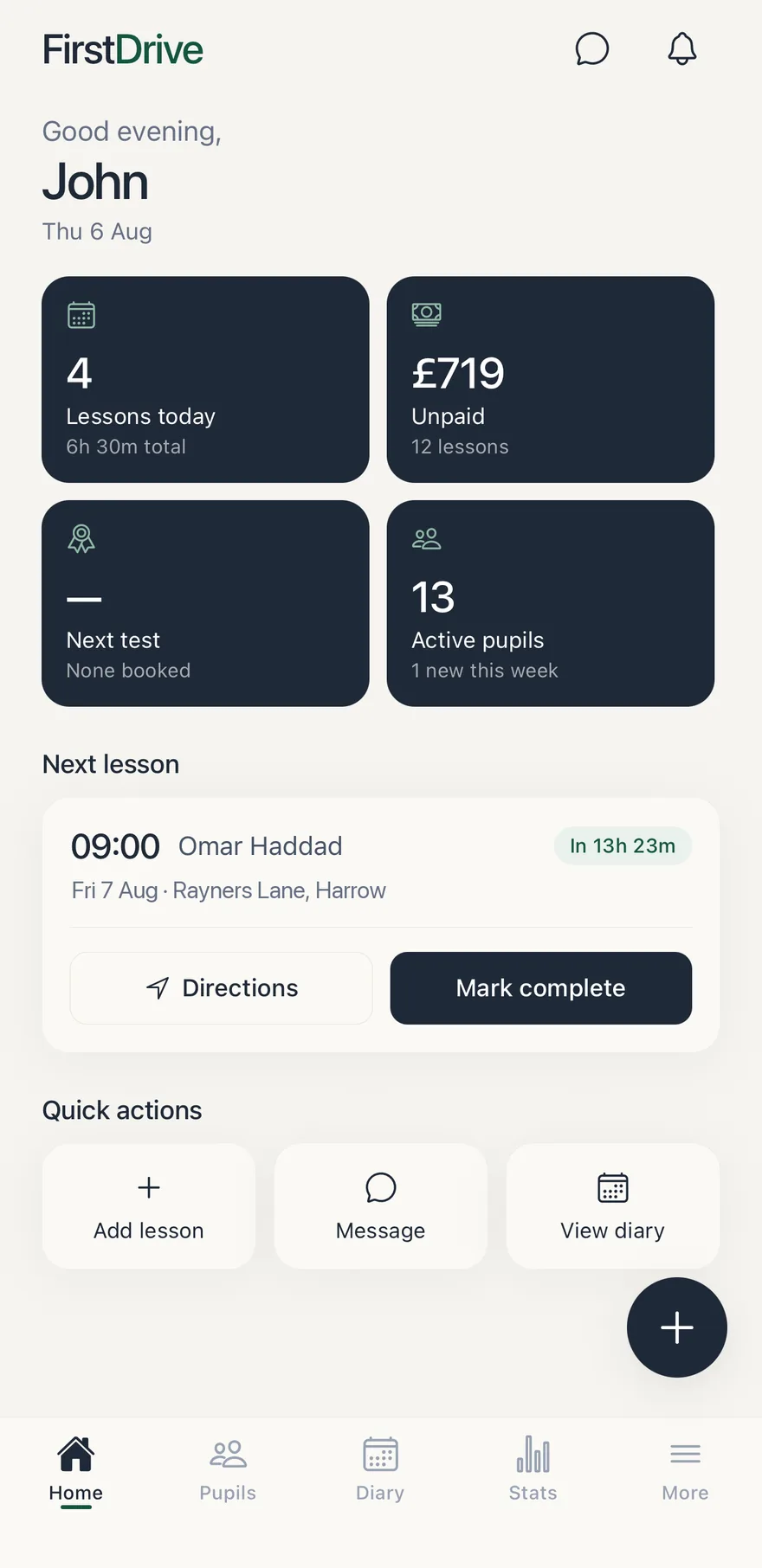
The FirstDrive home screen: today's lessons, what's unpaid, and the next lesson with directions
[02]

What you get

What you get with FirstDrive

Diary

Weekly and fortnightly pupils, tests and time off — and it knows your working hours, so it won't let you double-book yourself by accident.

Pupils

Hours banked, next lesson, next test, and a 35-topic syllabus rated 0–5 that your pupils can follow in their own app.

Stats

Expenses and mileage logged in seconds, totalled monthly, exported to CSV when your accountant asks.

Gaps

Your declared hours against what's actually booked, so the sellable time in your week stops being invisible.

[02]

Diary

Plan your week. Teach your day.

Use the web app for weekly planning and regular slots. On your phone, switch between a whole-week view and wider cards for the day, with the same seven-day header keeping your place.
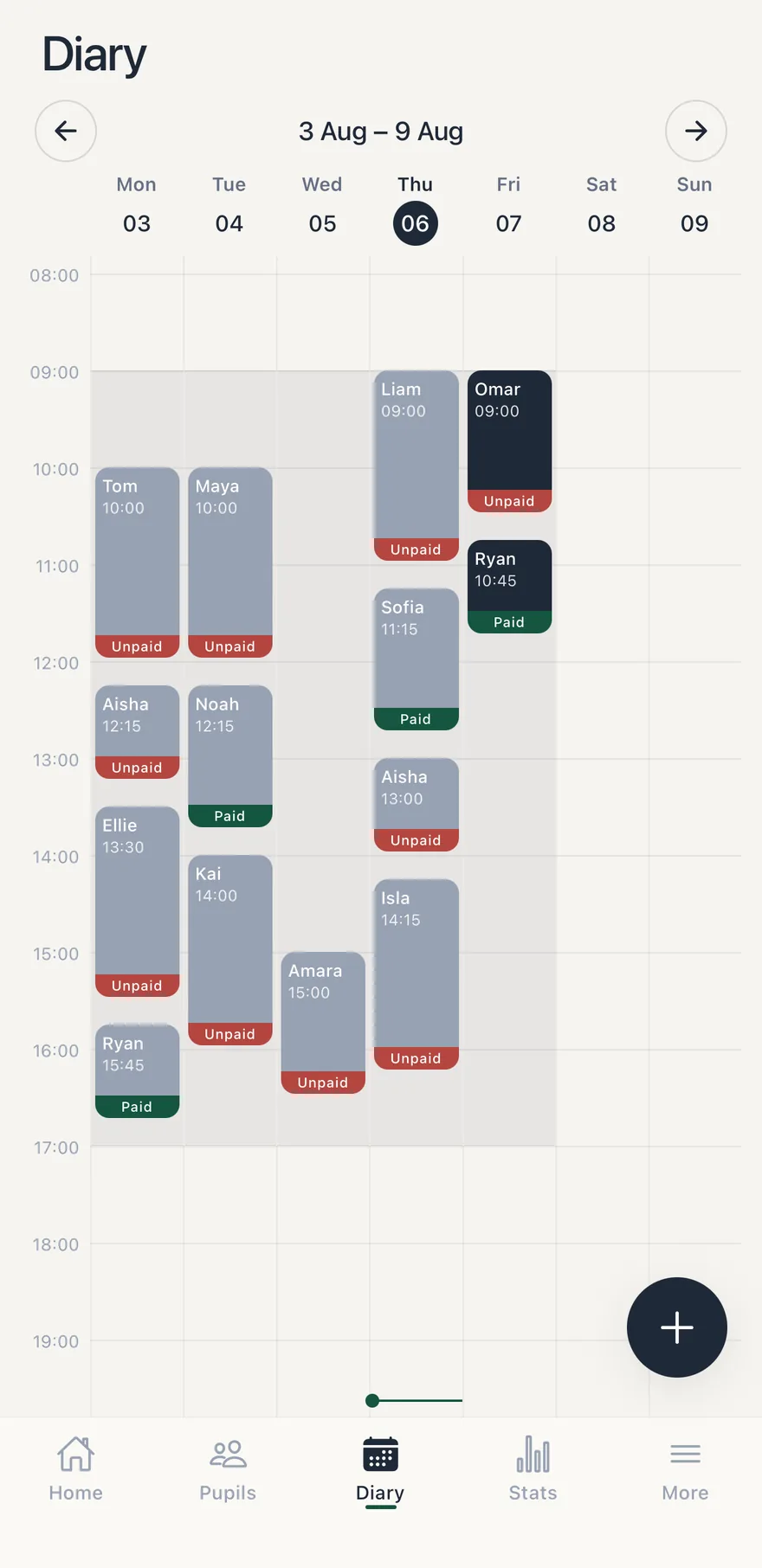
  • Weekly, fortnightly and one-off lessons
  • Driving tests marked out with the test centre
  • Clash, holiday and working-hours warnings you can override
  • Block out time off in two clicks
A week in the FirstDrive diary, each lesson marked paid or unpaid
[03]

Pupils

Everything you know about a pupil, in one place

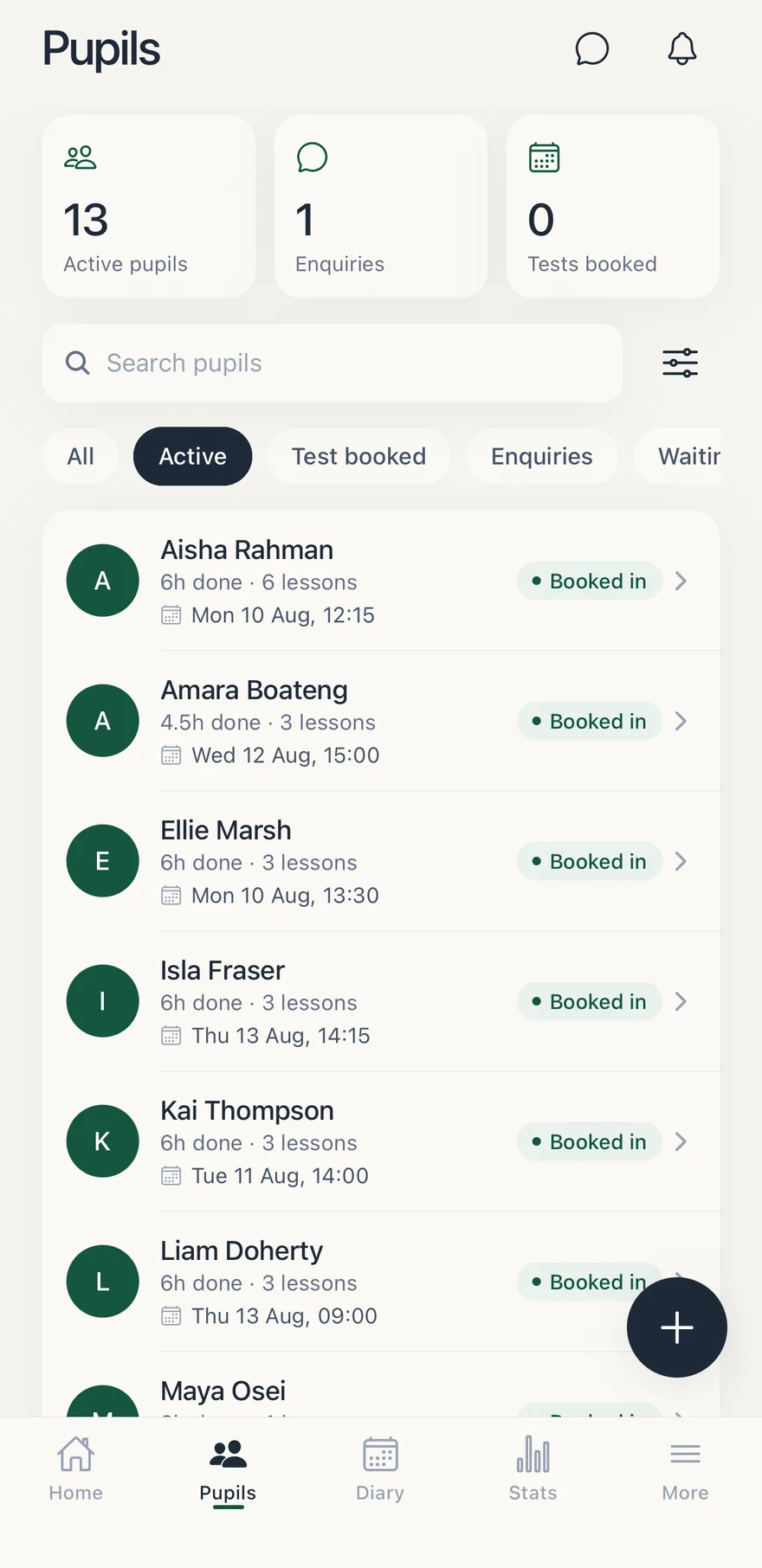
No more flicking between a notebook and a group chat. Each pupil has their hours, their notes, their regular slot and a syllabus you can mark off at the roadside — and they see the same progress in their own app.
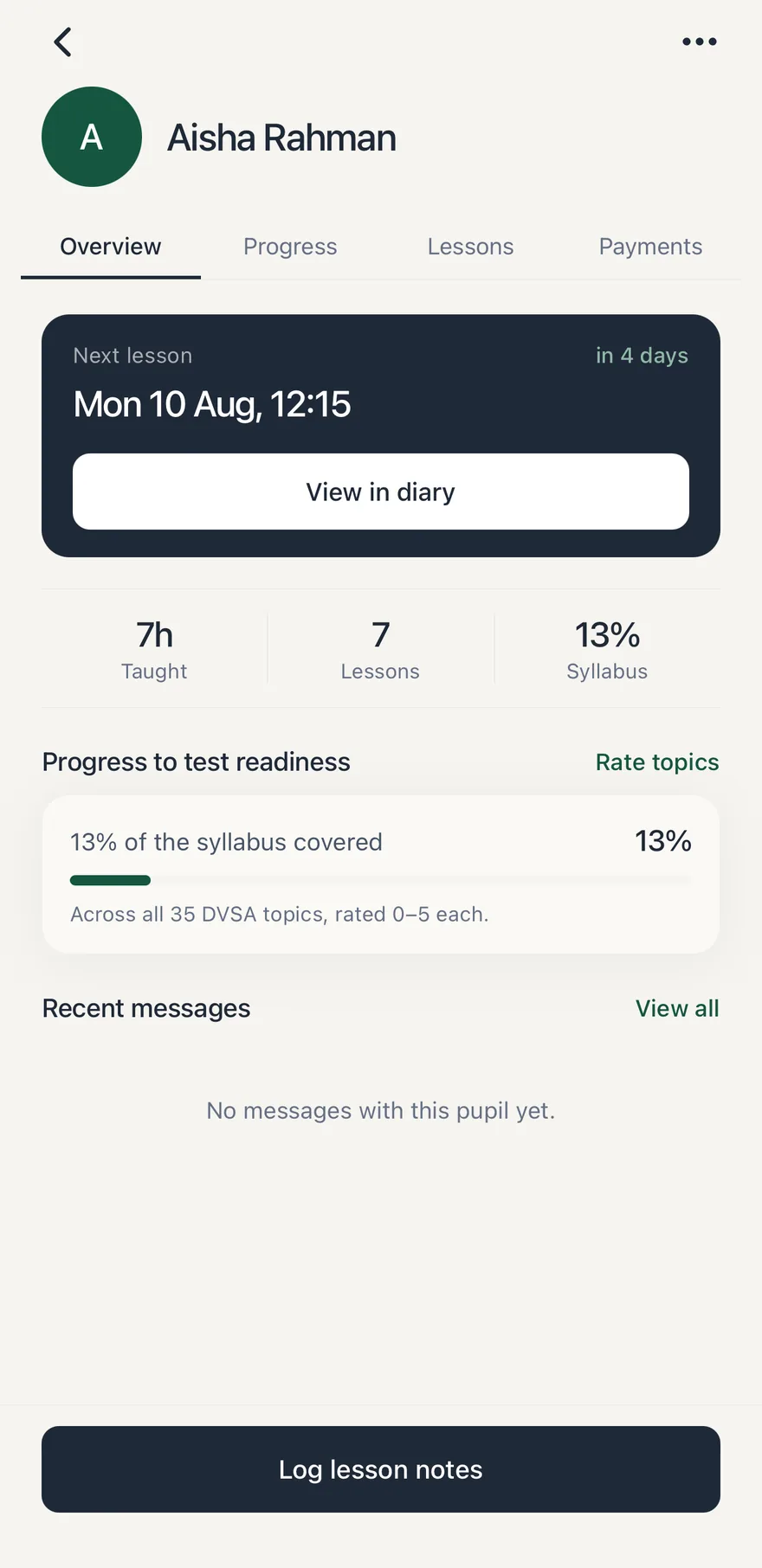
  • 35 syllabus topics rated 0–5, from introduced to independent
  • Lesson notes kept against the lesson they belong to
  • Invite by text, or share your instructor code
  • Flags pupils who've gone quiet for three weeks
The pupil list, each with hours done and their next lesson
One pupil's record: next lesson, hours taught and syllabus progress
[04]

Stats

Tax time, minus the shoebox

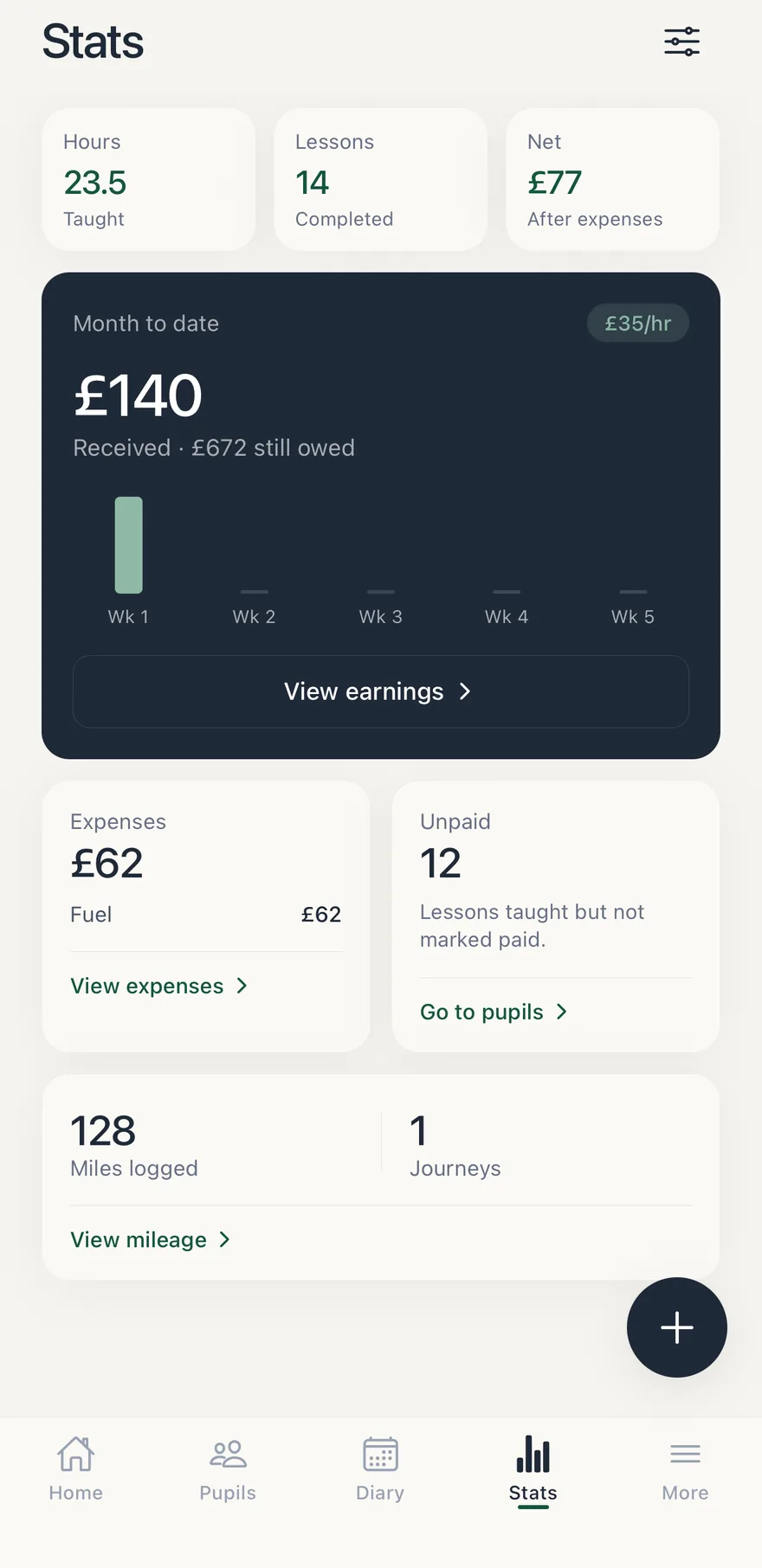
Record expenses and journeys during the week, then review your totals at your desk. Keep clear records for your accountant alongside your lesson payments, and keep track of vehicle and instructor renewals.
  • Fuel, insurance, maintenance, finance, cleaning
  • Journey records and period mileage totals
  • Monthly totals and a one-click CSV export
  • Renewal reminders so nothing lapses
Hours taught, lessons done and what's been received this month
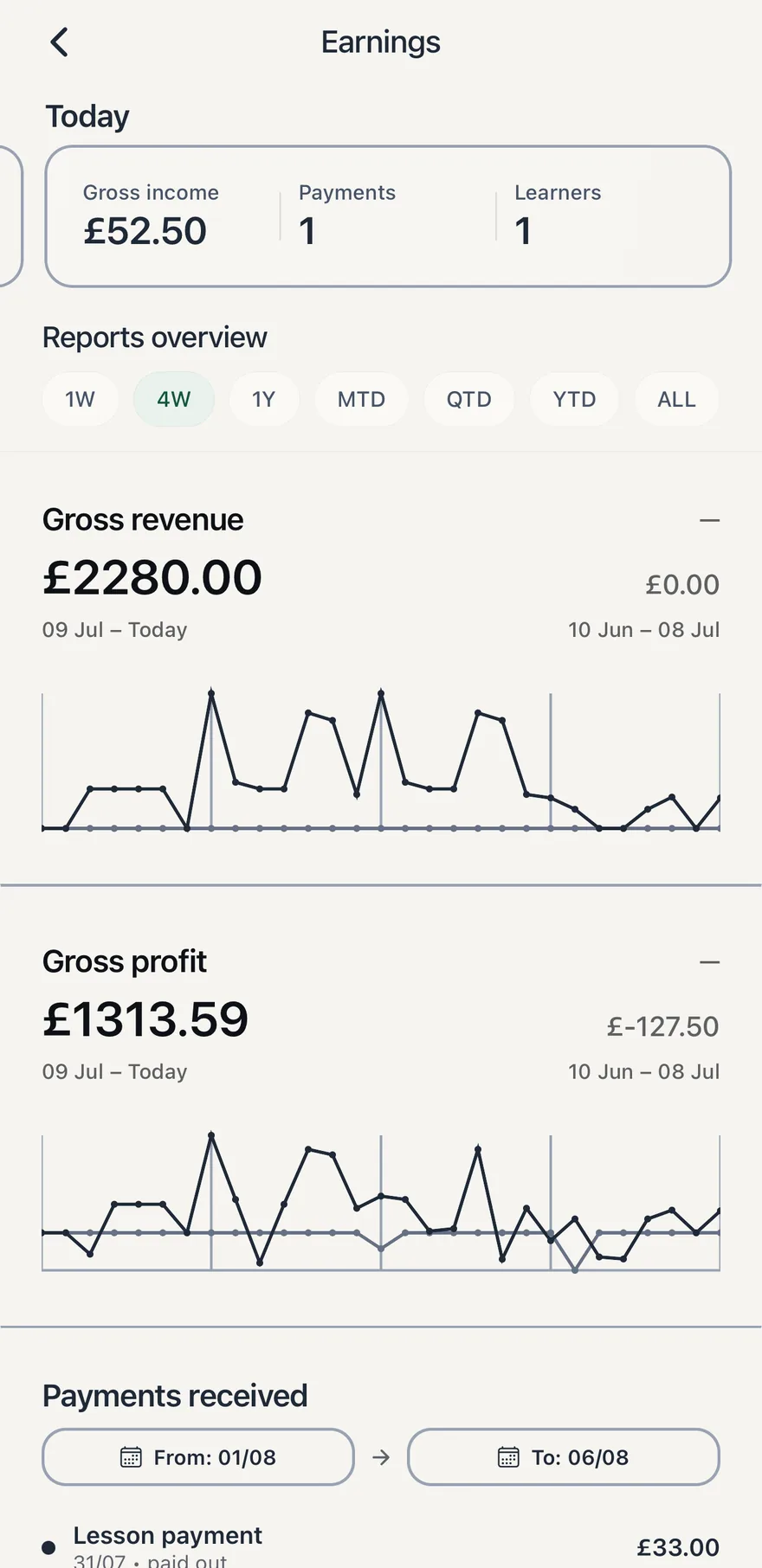
The earnings report: revenue and profit over the last four weeks
[05]

Gaps

See the money you're leaving on the table

Most instructors are within a couple of lessons a week of being full and can't see where. Gaps compares your declared hours against what's actually booked and shows you the sellable time, day by day.

  • Unsold hours, open slots and utilisation at a glance
  • Holidays and days off read as deliberate, not missing
  • Slivers under 45 minutes are hidden — you can't sell them
  • Your turnaround buffer is respected either side of a lesson
[06]

A closer look

Built around the work you do.

[07]

Getting started

Bring your existing pupils with you

You don't have to change how you teach, or ask your pupils to do anything you wouldn't.

  1. [01]

    Add your pupils

    Name and mobile is enough. Text them an invite, or give them your instructor code and approve them when they enter it.

  2. [02]

    Set your hours

    The days and times you teach, plus any regular break. That's what makes clash warnings and Gaps work.

  3. [03]

    Put your week in

    Add each regular slot once and it repeats. From there the diary, stats and gaps pages keep themselves up to date.

Get notified when it opens

[08]

Pricing

One price for the tool. Everything in it.

No tiers, no per-seat pricing, and no commission on the pupils you bring — however many lessons they take. The web workspace and mobile companion are included in the planned launch price.

Start with three months free when signups open. No card is needed to join the waitlist.

£8a month

Three months free at launch

  • Diary with clash, break and holiday warnings
  • Unlimited pupils, syllabus tracking and notes
  • Expenses, mileage records and CSV export
  • Gaps — the bookable time you haven't sold
  • The mobile app, in sync, included
  • No commission on your own pupils, however many lessons

No card up front · Manage your subscription on the web

[09]

Questions

Answered plainly

Anything else, email us — a person replies.

When does it launch?
Soon — we're finishing the last pieces with the instructors testing it now and opening in stages. Leave your email and you'll hear the day it opens. Your three free months start when you sign up, not when we launch, so waiting costs you nothing.
Do I need a card to start?
No. You get three months free with no card on file. We only ask for payment details when the trial ends, and you can leave before then without giving us any.
What happens when the trial ends?
You'll be prompted to subscribe for £8 a month. Until you do, everything you've entered stays readable — you just can't add or move lessons.
Do you take a cut of my lessons?
Not for the pupils you bring. Whether you invited them, they used your code, or you were already teaching them, they pay you exactly as they do today and we never take a penny of it — however many lessons they take.
Can I bring my existing pupils across?
Yes. Add your existing pupils, then send them an invitation or give them your instructor code. Approve their connection when they enter it.
Will my pupils have to use it?
Only if you want them to. They get their own app to see lessons and progress, but you can run FirstDrive purely as your own diary.
Can I cancel?
You can manage your subscription from Settings on the web. Available money reports can be exported to CSV for your records.
[10]

Be first in when it opens.

One email the day FirstDrive launches. Three months free, then £8 a month — no card up front.

One email when we open, nothing else. Three months free at launch.

How we use your email